
We are influencers and brand affiliates. This post contains affiliate links, most which go to Amazon and are Geo-Affiliate links to nearest Amazon store.
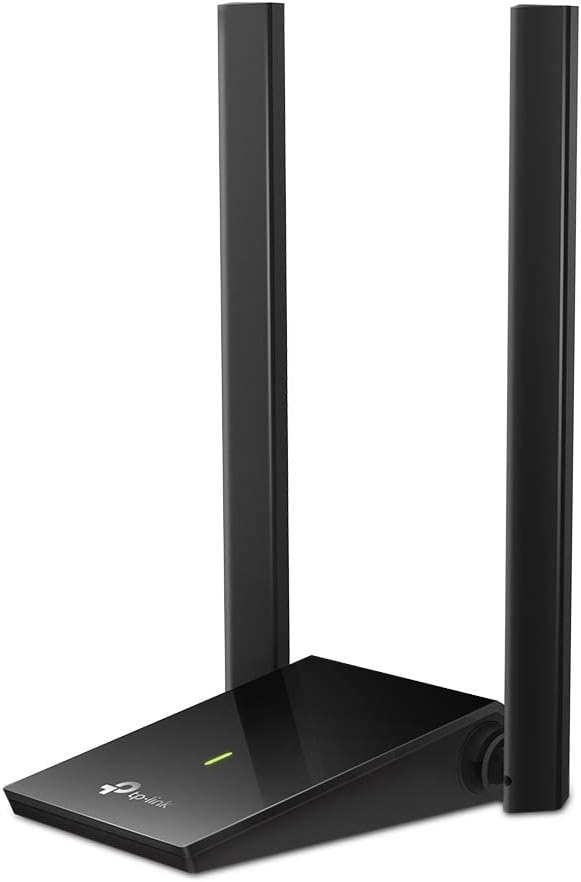
Desktop PCs are great when everything you need is already built in, but Wi-Fi is one area where older systems can fall behind quickly. Maybe the computer only has an aging wireless adapter, maybe it has no Wi-Fi at all, or maybe the router sits far enough away that the signal struggles through walls. Running Ethernet across the house is not always practical. The TP-Link Archer T4U Plus offers a straightforward alternative by adding dual-band Wi-Fi through a USB connection.
The exact Amazon listing is the TP-Link Archer T4U Plus AC1300 Dual High Gain Wireless USB Adapter, ASIN B08KHV7H1S. Amazon currently lists the adapter in stock, shipped and sold by Amazon.com. This is the desktop-style T4U Plus with two adjustable external antennas, not the smaller single-antenna T3U Plus. That distinction matters because the dual-antenna design is a major part of how this model is intended to improve reception.
The Archer T4U Plus supports dual-band 802.11ac Wi-Fi. TP-Link rates the 5GHz band at up to 867Mbps and the 2.4GHz band at up to 400Mbps. Those are theoretical wireless link rates rather than guaranteed internet speeds, and actual performance depends on your router, interference, distance, walls, network traffic, and internet connection. Still, dual-band support gives you the choice between the broader reach commonly associated with 2.4GHz and the faster, less crowded potential of 5GHz.
Two external 5 dBi high-gain antennas sit on the desktop base. They can be adjusted so you can experiment with orientation instead of leaving reception entirely to a tiny antenna hidden behind a metal PC case. That can be especially helpful with a tower computer sitting under a desk, where the rear USB ports may be surrounded by cables, furniture, and the computer chassis itself.
The desktop-style design also means the adapter does not have to stay plugged directly into the back of the computer. TP-Link includes a one-meter USB 3.0 cable, letting you position the antenna base on top of a desk or another location with a clearer path toward the router. Sometimes moving a wireless adapter a few feet and getting it away from the back of a PC can be just as useful as changing the antenna angle.
Connection to the computer uses USB 3.0. That interface provides plenty of bandwidth for the adapter’s 802.11ac wireless connection and avoids making the USB link the obvious bottleneck. USB 3.0 is backward compatible with older USB hardware, although getting the intended performance requires a suitable USB 3.0 connection on the computer.
MU-MIMO support is another useful feature when the Archer T4U Plus is paired with a compatible MU-MIMO router. TP-Link says the technology can create two simultaneous data streams, improving network efficiency compared with older single-stream approaches. MU-MIMO requires compatible networking equipment, so it should be viewed as a capability to take advantage of when the rest of your network supports it rather than a universal speed boost.
Compatibility is strongest on Windows systems. TP-Link’s current specifications list support for Windows 11, 10, 8.1, 8, and 7, while the Amazon listing also identifies Mac OS support for older versions. Mac users should check the exact operating-system version and current TP-Link driver availability before ordering because modern macOS compatibility can be more restrictive than Windows support.
Wireless security support includes WPA and WPA2 on the U.S. product documentation, along with older WEP modes. As with any Wi-Fi adapter, the actual security of the connection also depends on how the router and wireless network are configured. Using the strongest mutually supported security mode and keeping router firmware current remains important.
The adapter includes a status LED, which is a small but useful troubleshooting aid. If a desktop suddenly loses connectivity, being able to see whether the adapter is powered and active can help narrow down whether the problem is Wi-Fi, the USB connection, the driver, or something else on the network.
This is not a Wi-Fi 6 or Wi-Fi 7 adapter, so someone building a brand-new high-end desktop around the newest wireless standard may want newer hardware. The Archer T4U Plus makes more sense as an upgrade for a desktop that needs dependable 802.11ac connectivity, better antenna placement, or a simple way to add wireless networking without opening the computer case.
For an older desktop, that simplicity is the appeal. Instead of installing a PCIe wireless card and routing antennas behind the tower, you connect the USB cable, install the appropriate driver, position the dual antennas where reception is strongest, and join the network. It is a practical upgrade that can keep a perfectly usable PC connected without rearranging the room around an Ethernet cable.
If weak or missing desktop Wi-Fi is keeping a good PC tied to one corner of the room, pick up the TP-Link Archer T4U Plus on Amazon and give that computer a flexible dual-band wireless upgrade.
We are influencers and brand affiliates. This post contains affiliate links, most which go to Amazon and are Geo-Affiliate links to nearest Amazon store.

My name is Alice and I have been into gaming since I first got the Nintendo 64 in late 1996 and enjoy writing about all things relating to entertainment, gaming and streaming. Lately you can find me playing mostly MMO’s like WoW, FFXIV or Black Desert Online when I have time to game.