
We are influencers and brand affiliates. This post contains affiliate links, most which go to Amazon and are Geo-Affiliate links to nearest Amazon store.
Nowadays, internet speeds have increased significantly compared to previous years. As competition grows, consumers benefit from lower prices. However, if you have never paid much attention to your home internet plan, it might be time to do so. Download and upload speeds are really important when downloading files, uploading content online, using social media, watching YouTube, gaming, and much more.
If you are new to these terms, don’t worry; understanding the main terms is easier than you might think.
Download Speed: Think of this when downloading a game from the internet. The higher the speed, the faster the game will download. To put it in context, if your provider offers a 100 Mbps plan, downloading a 1 GB game would take around 1 minute and 22 seconds, whereas with a 500 Mbps plan, it would take only 16 seconds.
Of course, you won’t always use the maximum speed; in fact, most apps don’t even need that much speed. The main advantage of a high download speed is mainly when downloading large files or if many devices are using the connection at the same time. For example, if you just want to watch Netflix in 4K, you only need 15 Mbps or more.
Upload Speed: Upload speed may not be very important for some, but if you often upload large files to the internet, especially 4K videos, you will definitely appreciate having a good upload speed. It is also important for gaming, though 10 to 25 Mbps is usually sufficient for comfortable gameplay.
For example, if the server allows it, under ideal conditions, uploading a 5 GB file with a 100 Mbps plan would take almost 7 minutes, while with a 500 Mbps plan it would take less than 1 minute and 30 seconds.
Not all servers support such high upload speeds, but most support over 100 Mbps. Therefore, while 15 Mbps may be enough for casual use, it might not be sufficient if you constantly need to upload large files. Streaming services like Netflix, YouTube, or Prime Video, as well as general web browsing, rely mainly on download speed rather than upload speed.
An Important Topic You Might Not Know: Fiber Optic vs. Coaxial
You have probably heard that fiber optic is the best for symmetrical internet speeds, meaning equal download and upload speeds. However, fiber optic networks are not available everywhere. Companies have gradually improved coverage, but have you ever wondered why? Basically, at the beginning of the internet, companies used coaxial fiber because it was also compatible with television.
The main problem with coaxial fiber is that, while it can offer high download speeds, older cables can barely provide more than 15 Mbps, and even DOCSIS 3.1 cables (an improved version of DOCSIS) only reach up to 100 Mbps. Therefore, if you value uploading large files quickly, you should definitely make sure you have a good upload speed.
The Easiest Way to Check Internet Speeds: Speedtest
Speedtest is a free speed testing service owned by Ookla and is considered the most reliable. The best part is that it is really easy and fast to perform a speed test. You can go directly to the official Speedtest website or download the app available for Windows, macOS, Android, and iOS from their respective app stores, which is recommended if you are looking for accuracy.
Below, I show a real test performed on my home internet using the Speedtest app for Windows.
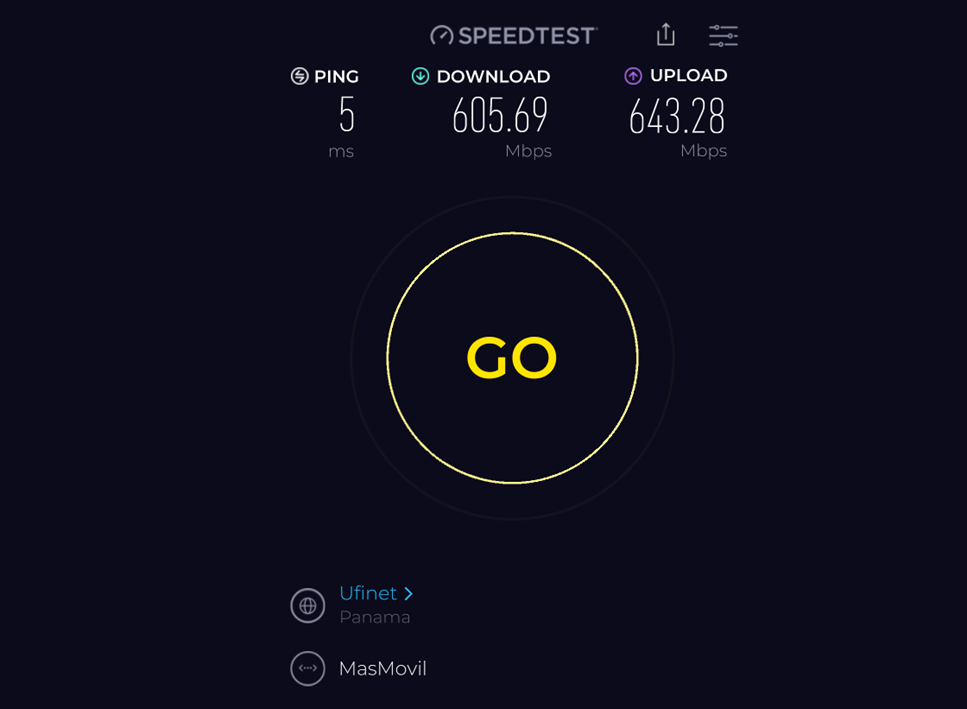
As you can see, it is very easy to read the provided data. The service I have is a great deal, costing just over $20, so I am satisfied with having fiber optic internet.
Now, you just need to check for yourself whether the data shown is close to what your provider indicates. If it isn’t, you should contact them to send a technician to resolve the issue if it cannot be fixed through software. As a recommendation, make sure to perform the test near your router or, preferably, through an Ethernet cable from your laptop or PC.
Click here to visit the official Speedtest site
We hope this article has cleared up your doubts about how to check your internet speed!
We are influencers and brand affiliates. This post contains affiliate links, most which go to Amazon and are Geo-Affiliate links to nearest Amazon store.

My name is Joel! I love to read, I go to university like most people my age.
In my free time I usually train boxing, I love music, I also know how to play the guitar and the harmonica.