
We are influencers and brand affiliates. This post contains affiliate links, most which go to Amazon and are Geo-Affiliate links to nearest Amazon store.
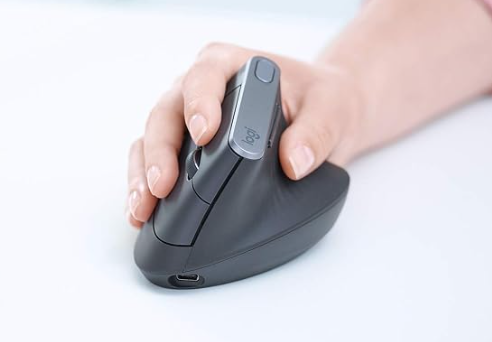
Spending hours at a computer can make a normal mouse feel less normal by the end of the day. Your hand stays rotated flat against the desk, your wrist repeats the same small movements, and the mouse gets pushed around thousands of times during email, spreadsheets, editing, and browsing. The Logitech MX Vertical takes a very different approach by rotating the entire mouse into a more natural handshake-style position.
The exact product is the Logitech MX Vertical Advanced Ergonomic Mouse in graphite. This is a rechargeable right-handed ergonomic mouse designed primarily for medium to large hands rather than a compact travel mouse.
The most obvious feature is the 57-degree vertical angle. Instead of forcing your palm to face downward, the shape lets your hand rest closer to a handshake position. Logitech says this design reduces pressure on the wrist and, in its testing against a conventional non-vertical mouse, reduced muscular strain by 10 percent. That does not make it a medical device or guarantee that it will solve discomfort, but it explains why the shape feels so different from a traditional mouse.
The body is sculpted around that upright position and includes a dedicated thumb rest. A textured rubber surface gives the hand something secure to hold without requiring a tight grip. The unusual shape can take a little time to get used to, especially if you have spent years using a flat mouse, but the goal is to let the arm and hand work from a less rotated position.
Tracking is handled by a high-precision optical sensor adjustable from 400 to 4,000 DPI. Logitech specifically highlights the 4,000 DPI capability because higher pointer sensitivity can reduce the physical distance your hand needs to move across the desk. The company says it can result in four times less hand movement compared with a conventional mouse using a 1,000 DPI sensor under its test conditions.
A cursor-speed button lets you change pointer speed and precision quickly. That can be useful when moving between jobs that need different kinds of control. You may want faster movement across a large monitor while working through documents, then slower and more precise movement when editing an image or selecting small interface elements.
Connectivity is unusually flexible. The MX Vertical can connect through Bluetooth, the included Logitech Unifying USB receiver, or the USB-C charging cable. It can pair with up to three computers and switch among them using Easy-Switch. If your desk includes a work laptop and personal computer, that can eliminate the need for separate mice.
Logitech Flow adds another layer when used with compatible systems and Logitech software. It is designed to let the mouse move between supported computers and even help transfer text, images, and files from one system to another. That feature requires the proper software and network setup, but it can be useful for people whose workflow regularly crosses multiple computers.
The built-in rechargeable lithium-polymer battery is rated for up to four months on a full charge, although actual battery life varies with use. Fast charging is particularly handy because Logitech says one minute of charging can provide up to three hours of use. The mouse charges through USB-C, and it can continue working while connected by cable.
Logitech lists the MX Vertical at roughly 135 millimeters tall, 79 millimeters wide, and 78.5 millimeters deep, with a weight around 135 grams. That makes it much larger than a portable laptop mouse. The size is intentional because the shell is designed to support the hand rather than disappear into a travel pouch.
There are four customizable buttons, and Logi Options+ can be used on supported Windows and macOS systems to adjust pointer behavior and button functions. Customization can make a noticeable difference in repetitive work because frequently used commands can be placed directly under your fingers instead of requiring another trip to the keyboard.
The MX Vertical is not going to be the right mouse for everyone. It is right-handed, its larger body is better suited to medium and large hands, and the vertical posture takes some adjustment. Gamers looking for an ultra-light mouse or very high polling performance will also be better served by a dedicated gaming model.
For office work, creative tasks, and long days spent moving through applications, however, the MX Vertical offers something more meaningful than another row of buttons. It changes the position of your hand and wrist while still providing accurate tracking, multiple-device switching, rechargeable power, and the productivity features expected from Logitech’s MX line.
If a traditional mouse keeps feeling less comfortable as the workday gets longer, pick up the Logitech MX Vertical on Amazon and try a more natural angle for the hand that does all the clicking.
We are influencers and brand affiliates. This post contains affiliate links, most which go to Amazon and are Geo-Affiliate links to nearest Amazon store.

My name is Alice and I have been into gaming since I first got the Nintendo 64 in late 1996 and enjoy writing about all things relating to entertainment, gaming and streaming. Lately you can find me playing mostly MMO’s like WoW, FFXIV or Black Desert Online when I have time to game.