
We are influencers and brand affiliates. This post contains affiliate links, most which go to Amazon and are Geo-Affiliate links to nearest Amazon store.
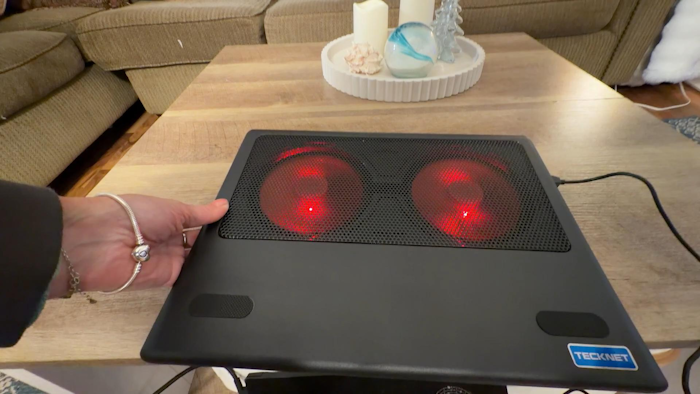
If you’ve ever used a high-performance laptop, you know the struggle. You’re in the middle of a project or a gaming session, and suddenly your keyboard feels like a radiator, and your internal fans sound like a jet engine preparing for takeoff. Overheating isn’t just an annoyance; it’s a hardware killer.
I recently had the chance to test out the TeckNet Laptop Cooling Pad, specifically to address a critical overheating issue with an older Razer laptop. In this review, I’ll walk you through the design, the performance, and why this simple accessory might be the lifeline your aging or overheating machine needs.
The Problem: When Heat Destroys Hardware
Before diving into the product itself, it is worth establishing why a device like this is necessary. The laptop used in this test is a cautionary tale. It’s an older Razer model that ran so hot during regular use that it actually caused the internal battery to swell.
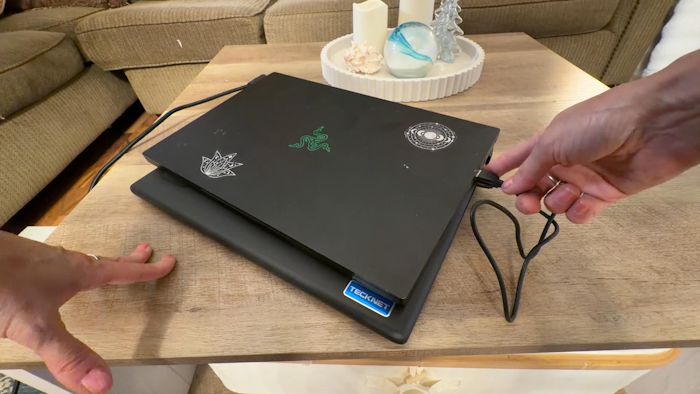
Battery swelling is a dangerous side effect of chronic overheating—a phenomenon known as thermal runaway or simply excessive heat exposure degrading the lithium-ion cells. The situation got so bad with this particular machine that the battery had to be completely removed for safety. Now, the laptop runs strictly on AC power, but the heat issue remains. Without a battery to act as a buffer and with the components still generating massive thermal energy, external cooling wasn’t just a luxury; it was a necessity to keep the machine functional.
This is where the TeckNet Cooling Pad steps in. It promises to provide the ventilation and active airflow that internal laptop fans often struggle to achieve on their own.
Design and Compatibility
Size and Fit
The TeckNet pad is designed to support laptops ranging from 12 to 15 inches. In our test, the Razer laptop (a standard 15-inch form factor) sat perfectly on the surface. The pad isn’t overly bulky, making it a viable option for those who have limited desk space or need to pack it into a messenger bag for on-the-go use.
Aesthetic and Build
Out of the box, the unit sports a sleek, black metal mesh surface. This mesh isn’t just for looks; it’s a functional choice that allows for maximum airflow with minimal resistance.
When plugged in, the pad comes to life with Red LED lighting integrated into the fans. It gives the setup a distinct “gamer” vibe that matches well with the Razer’s green glowing logo. For those who prefer a cooler tone, TeckNet also manufactures a version with Blue LEDs, so you can match the lighting to your specific setup or preference.
The underside of the pad features additional ventilation slots, ensuring that the air being pulled in by the fans isn’t choked off if you’re using it on a slightly softer surface, like a couch cushion or your lap.
Performance: The Dual-Fan Solution
The core of this cooling pad is its dual-fan architecture. Unlike some pads that use one large, slow-spinning fan, the TeckNet uses two medium-sized fans positioned to target the most common heat zones on a laptop (usually the CPU and GPU areas).
Cooling Efficiency
Upon connecting the USB cable, the fans spin up immediately. The airflow is directed upward through the metal mesh, hitting the underside of the laptop directly.
For the battery-less Razer, the difference was palpable. Laptops often rely on passive cooling through their chassis to dissipate heat. By forcing cool air against the bottom panel, the TeckNet pad assists in that heat exchange. It creates a constantly refreshed layer of cool air, preventing the “hot pocket” that usually forms between a laptop and a desk. While we didn’t measure exact thermal degrees in this specific test, the tactile difference was clear: the machine remained cooler to the touch, and the peace of mind provided for a laptop that had already suffered heat damage was invaluable.
Acoustics: Is it Loud?
One of the biggest concerns with aftermarket cooling is noise pollution. You don’t want to drown out your music or game audio with the whine of a cheap plastic fan.
During the test, the TeckNet performed impressively in the acoustic department. The user noted that while the operation isn’t silent—“You can hear it a little bit”—it is fairly quiet. It generates a low hum that easily blends into the background noise of a room. It is certainly quieter than the internal fans of a gaming laptop ramping up to 100% speed. If you are working in a library or a quiet office, this pad is unlikely to disturb your neighbors.
Usability and “On-the-Go” Features
The device is powered via a simple USB connection. This is a standard for cooling pads, allowing you to power the fans directly from the laptop itself without needing to hunt for a wall outlet. This creates a self-contained ecosystem that is easy to move around.
The reviewer noted that this setup is “great for on the go.” Because the pad is slim and lightweight, it doesn’t add significant burden to your carry weight. Whether you are moving from the living room coffee table to a desk, or traveling to a cafe, the pad is portable enough to come with you.
Final Verdict
The TeckNet Laptop Cooling Pad is a straightforward, effective solution to a complex problem. It doesn’t try to reinvent the wheel with complicated software or RGB customization; it simply moves air effectively where you need it most.
Pros:
- Effective Cooling: Dual fans provide excellent coverage for 12-15 inch laptops.
- Quiet Operation: Audible but unobtrusive background noise.
- Good Build: Metal mesh surface aids in passive heat dissipation.
- Visual Appeal: The Red LED lighting adds a nice touch for gaming setups.
- Value: It serves as a critical fail-safe for older or damaged laptops.
Cons:
- USB Occupancy: It occupies a USB port on your laptop (though this is standard for the category).
- Lighting Control: The LEDs appear to be tied to the fan power, meaning you likely cannot turn the lights off while keeping the fans running.
If you have a laptop that runs hot—or if you have a horror story like a swollen battery in your history—spending a few dollars on a cooling pad like this is a no-brainer. It is an inexpensive insurance policy for your expensive hardware. For this Razer laptop, it’s the only thing keeping it running cool and stable, proving that you don’t need to buy a new computer to solve thermal throttling; sometimes, you just need better airflow.
We are influencers and brand affiliates. This post contains affiliate links, most which go to Amazon and are Geo-Affiliate links to nearest Amazon store.

My name is Alice and I have been into gaming since I first got the Nintendo 64 in late 1996 and enjoy writing about all things relating to entertainment, gaming and streaming. Lately you can find me playing mostly MMO’s like WoW, FFXIV or Black Desert Online when I have time to game.