
We are influencers and brand affiliates. This post contains affiliate links, most which go to Amazon and are Geo-Affiliate links to nearest Amazon store.

If you are currently working with PDF files containing dozens or even hundreds of pages, it can be overwhelming to read everything, especially if it is not absolutely necessary, but you still want to understand what the document is about. This can be especially useful if you are preparing for an exam, a conference, or simply want to get the results faster without spending too much time reading and trying to figure everything out on your own.
For these situations, you can use AI tools like ChatGPT or Gemini, which are also good options for this type of task. However, sometimes summaries can be too short because these AI models often prioritize faster responses instead of deeply analyzing long documents.
Based on my own experience, one of the best options is Gemini Notebook, a platform that has been integrated into Gemini but also has its own website. It is a complete tool and definitely worth trying because it offers many advanced features that are not usually available in the standard Gemini interface.
How to Use Gemini Notebook?
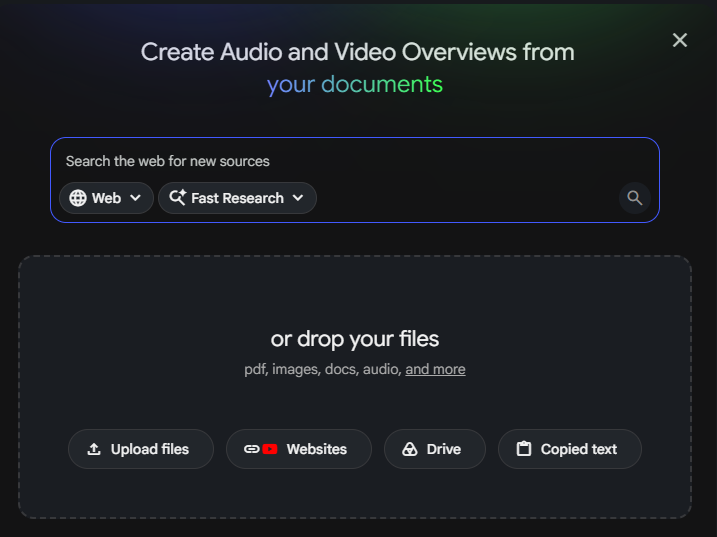
Once you enter the Gemini Notebook website and create a new notebook, you will be taken directly to the interface where you can work according to your needs. There are many things you can do here, but we will mainly focus on what we mentioned earlier: creating an audio summary of a PDF file.
First, we need to manually search for or upload the PDF file we are interested in. In my case, I created an article about artificial intelligence and the possible changes we could see by the year 2050.

Once the document is successfully uploaded, Gemini Notebook automatically creates a small written summary explaining what the document is about. However, this is not exactly what we are looking for. In the chat section, we can specify what we want it to create in the audio summary. We can ask for a general overview or request that it focuses on a specific topic we are interested in.
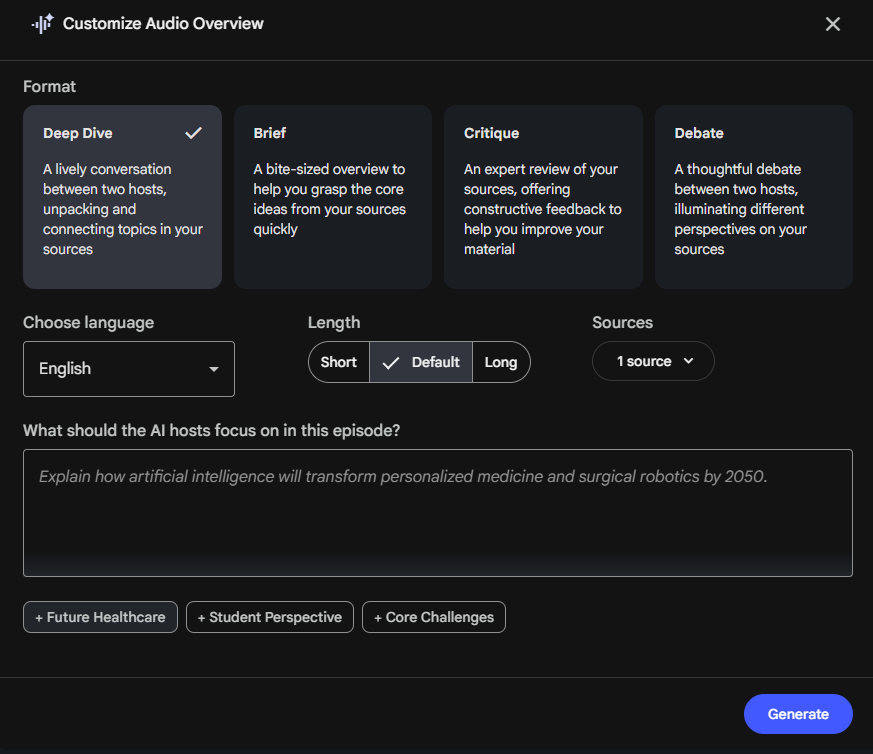
Once that is done, you need to go directly to the right panel and select "Audio Overview" from all the available tools. This feature will create an audio summary based on the instructions you provided.
When you open Audio Overview, you can customize how the audio will be generated. You can choose the type of conversation, the language, the approximate length, and even tell the AI which parts of the document you want it to prioritize. Once everything is configured, simply click Generate and Gemini Notebook will begin creating the audio file within a few minutes.
The generation process takes around 8-10 minutes according to my own tests, and you need to specify exactly how long you want the audio summary to be. By default, it generated a summary of up to 15 minutes, but when I selected the short option, it created a summary of 1 minute and 40 seconds. So the final result can vary significantly depending on your settings.
My recommendation is that if your document contains a lot of important information, you should choose the long option because it reduces the chances of important parts being cut out or not being properly covered in the summary.
It is a very useful AI tool because the result feels surprisingly realistic. Normally, there are two AI narrators explaining the content as if they were having a conversation between friends.
And that is everything for today. I hope this tool is useful for you, and I will see you in the next article.
We are influencers and brand affiliates. This post contains affiliate links, most which go to Amazon and are Geo-Affiliate links to nearest Amazon store.

My name is Joel! I love to read, I go to university like most people my age.
In my free time I usually train boxing, I love music, I also know how to play the guitar and the harmonica.