
We are influencers and brand affiliates. This post contains affiliate links, most which go to Amazon and are Geo-Affiliate links to nearest Amazon store.
I have luckily managed to figure out how to get my Canon MF3110 printing with Windows 7 64 bit even though there is no driver for Windows 7 64bit for the Canon MF3110 Multifunction Printer. The solution is to download the Windows 7 64 bit printer drivers for the Canon MF5750 and then install the drivers as your LPT1: Printer. Note this same work around should work in theory with the Canon MF3111 model as well.
You know you have the right file because if you go to Canon’s website link here:
http://www.usa.canon.com/consumer/controller?act=ModelInfoAct&tabact=DownloadDetailTabAct&fcategoryid=335&modelid=11148
Select Windows 7 (x64) in the drop down
And download these drivers:
MF5730_5750_MFDrivers_Win_x64_us_EN_7.exe
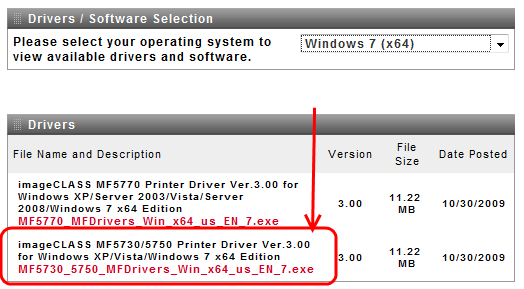
Install a new Printer and Select these drivers. Set it as the LPT1: port.
Then plug in your MF3110 USB printer and when it looks for drivers “say Have Disk”
Select the drivers for the MF5750 and it should work for you.
I was able to get this configuration working and printed some test pages without issue.
I was also able to install a NetGear WGPS606 Wireless Print server and get my Canon MF3110 and Epson Photo 1400 working just fine on my Windows 7 64 bit machine.
So for anyone looking to hack job their Canon MF3110 so that it can at least print on a Windows 7 64 bit or Windows Vista x64 bit Operating System, know that you can get this to work by leveraging the MF5730 drivers from CanonUSA.com.
Update:
Make sure you read the comments in this article if you are having trouble, many people have taken the time to share their own tips that have worked for them, and if the article doesn’t solve your problem you may find a solution by one of my generous commenters here.
Update:
One of my readers Milan provided the following solution as well which helped many other readers so I am reprinting here in the article so you don’t have to dig through the comments to find it.
Requirements:
- Get the driver for MF5700 series Windows 7 64bit (from canon.com)
- MF Update Tool http://software.canon-europe.com/software/0022381.asp?model=
Instructions:
- Unzip the driver
- Install printer MF5700 browsing the MF5700AU.inf file
- Do it via USB Virtual Printer port (I have USB cable). and didn’t share it at first.
- Run the MF Update Tool- it showed me step by step what to press on the printer to make it work.
- Then solve the “CHECK PAPER SIZE” error by right clicking the MF5700 printer, then Printer properties, Specify, Default settings, and setting Page size and Output size to A4. Then it should print ok.
For the scanner:
- Open the folder with driver files
- Open the MF12SCN.inf file and added fourth line to one section so it looked like this (copy and paste it to see it properly):
[Models.NTamd64.5.1]
%LPTENUM\MF5730.DeviceDesc%=MF5730Install_XP,USB\VID_04A9&PID_265D&MI_00
%LPTENUM\MF5750.DeviceDesc%=MF5750Install_XP,USB\VID_04A9&PID_265E&MI_00
%LPTENUM\MF5770.DeviceDesc%=MF5770Install_XP,USB\VID_04A9&PID_265F&MI_00
%LPTENUM\MF5770.DeviceDesc%=MF5770Install_XP,USB\VID_04A9&PID_2660&MI_00
- Then run the Device manager
- then Action, Add older hardware, Imaging Device and installed random scanner.
- Then open its properties, Hardware, Properties, Change settings, Driver, Update driver and chose the MF12SCN.inf file to reinstall it. (I had to make it this way, the scanner driver wasn’t available at first)
- Then it scanned ok, but MF Toolbox didn’t work.
- Double clicking the scanner device also runs scanning so it’s ok.
- Then enable sharing in the Printer properties
- That’s It, you should now be able print from computers with WinXP.
- Just had to change the Network settings to Home group, checked the passwords and reboot system.
Update:
Steve kindly offers some information to help get the Canon MF3110 working with Windows 8 as well, here was his tips:
I´ve tried this for windows 8 pro and it works, but with a little exception to the guide above.
First download the driver for the 5700 and install a printer according to the guide above,
Plugin the MF3110, remove the drivers if you´ve aldready tried to install it.
In “Control Panel/Hardware and Sound/Devices and Printers” Right click on the MF3110, chose “hardware”
OBS! here its important to have the second option in the list selected “CanonMF3110” not the first “MF3110”, when you´ve selected the second option click “properties” at the bottom. Click “Change settings” click on the “Driver” tab and chose “update driver” and then “browse my computer for driver software”, then “Let me pick from a list of device drivers…”
Scroll down and pick “Printers”. DONT CLICK have disk if your’e using windows 8 here, instead choose Canon in the left bar and find the “Canon MF5700 Series”, click Yes, next, next and you should be set.
If you are looking for a replacement multi-function laser printer, here are some other Windows 6 64bit certified AIO Laser Printers:
HP OfficeJet Pro 7740


Ricoh 408235 SP C261SFNw Color Laser Printer

We are influencers and brand affiliates. This post contains affiliate links, most which go to Amazon and are Geo-Affiliate links to nearest Amazon store.

I have been obsessed with computers, tech, gadgets and games since the early 1980’s having grown up on the Commodore 64 and Amiga computers.
By day I work in the IT Security Industry and have been in IT for over 20 years. On my spare time I am a Vlogger, Blogger, Streamer, Gadget Reviewer, affiliate marketer, influencer and entertainer. I am also an avid movie fan, TV Show fan, Anime fan, video game fan and fan of trying anything and everything new.